

Documentation Index
Fetch the complete documentation index at: https://levelblue-final.mintlify.app/llms.txt
Use this file to discover all available pages before exploring further.
| Applies to Product: | USM Appliance™ | LevelBlue OSSIM® |
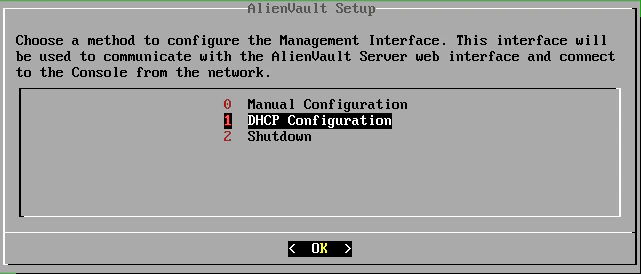
- On the LevelBlue Setup screen, select DHCP Configuration.
- USM Appliance displays the network settings assigned by your DHCP server. Press Enter to apply. USM Appliance configures the management interface and LevelBlue services.
- On the LevelBlue Setup screen, select Manual Configuration.
- Type the IP address and press Enter.
- Type the Netmask for the network and press Enter.
- Type the Gateway for the network and press Enter.
-
Type the IP address of the DNS server and press Enter.
Note: If you have multiple DNS servers, type each of their IP addresses separated by a comma.
- Verify the values you entered previously and press Enter. USM Appliance configures the management interface and LevelBlue services.