

Role Availability | ❌ Read-Only ❌ Analyst ✔️ Manager USM Central offers a Representational State Transfer (REST) API framework that enables you to customize elements of data in your environment. The APIs return JSON responses with errors that use HTTP response codes. To access the API, you need to create a client identification (ID) and secret code in the USM Central interface, and use that information to create a token. USM Central uses Open Authorization (OAuth) 2.0 to authenticate against the REST APIs. To open the API Clients page At the bottom of the expanded pane of the USM Central web user interface (UI), hover over theDocumentation Index
Fetch the complete documentation index at: https://levelblue-final.mintlify.app/llms.txt
Use this file to discover all available pages before exploring further.
 icon and select Profile Settings > API Clients.

- Click New Client to create a new client. See the LevelBlue APIs for more information.
-
At the bottom of the expanded pane of the USM Central web user interface (UI), hover over the icon and select Profile Settings > API Clients.
-
Locate the API client that you want to delete and click Delete Client.
The delete client dialog box opens.
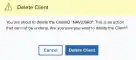
- Click Delete Client.